I thought I’d write up a post on how I edit the photo’s on my iPhone. Sharing the common problems and the apps I use to fix them, some apps are for editing, some are fun photo effects. So, here’s what I use on a daily basis to quickly, simply tweak and perfect the photos from my phone…
Brightening up a photo.
Sometime’s it’s too dark to take (the ‘perfect’ instagram) photos, leaving pictures looking dull or with an orange tint due to indoor lighting such as lamps or overhead lighting. Here’s a before and after…
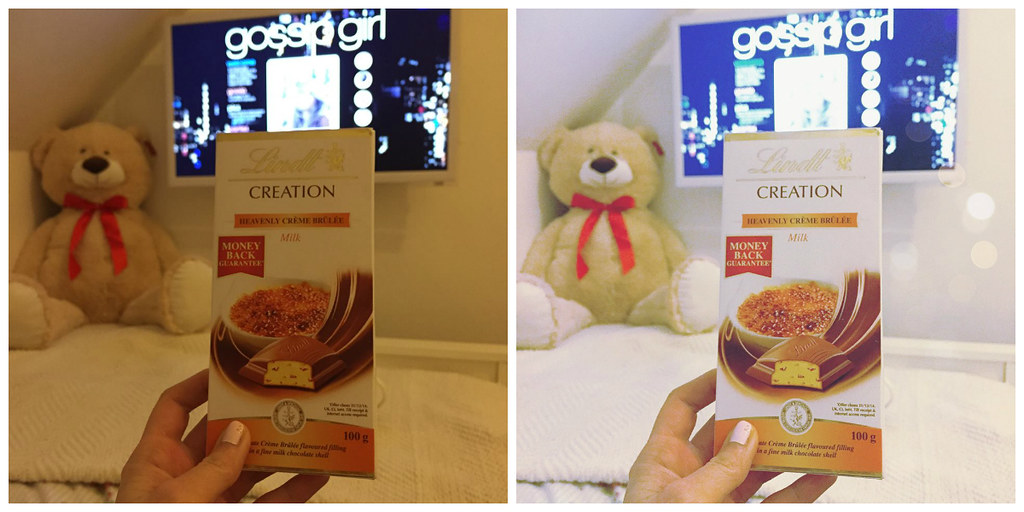
The app you need? Afterlight cost: 79p.

Open the Afterlight app, upload the photo you wish to edit. You will see an icon of slider bars, open it and a menu of icons will open above it. You will see a symbol that looks like the sun, this is ‘brightness’ slide the bar across until it brightens up and lightens the dull, dark photo.
Adding cute doodles and phrases to a photo.
Sometimes it’s nice to add cute little illustrations to a photo, it’s a nice way of saying where something is from, adding a bit of humour, cutesy-ness or even a watermark in a pretty, colourful font.
Sometimes it’s nice to add cute little illustrations to a photo, it’s a nice way of saying where something is from, adding a bit of humour, cutesy-ness or even a watermark in a pretty, colourful font.

The app you need? Pic Candy cost: free

Open Pic Candy, choose the photo you’d like to edit. You can choose from tons of cute ‘doodles’ and ‘phrases’ you can easily change the colour, size and position of these on your photograph. Even choose from quite a few pretty different fonts to add a watermark to your photo.
Creating Collages
You’ve seen this style on my blog before, lots of little pictures into one big collage. There’s quite a few apps for doing this, but this one is my favourite. You can select all of the photos you want at the same time, unlike a lot of the apps where you have to select one at a time, which can take a while.

The App you need? fotor cost: free (in app purchases available)

I love that there’s so many different little ways to edit and tweak your collage and photos all within one app, this is so handy and useful. Definitely my favourite collage creating app simply for ease.
Sharpening or adding cool / warm tones.
Sometimes photos can look a little blurry, they can also look warm (orange tinted) or cool (blue tinted) due to lighting. I find lamps and large overhead indoor lights often cast a warm, yellow tone to my pictures, which isn’t great when in ‘real life’ my room is bright white.

The app you need? instagram cost: free

Open the instagram app, after choosing which photo you would like to edit and upload to instagram you will see three icons. Click the wrench / spanner icon at the end. This brings up a whole load of editing tools. You will see a thermometer icon, this is how you increase or decrease warm and cool tones.
So, that’s how I edit my iPhone photographs before sharing them on instagram and twitter and the likes… What do you think? Do you have any photograph editing apps that you enjoy using? If so, let me know in the comments 🙂



This is great! I've been looking for some free apps to edit my photos. Thanks so much for sharing these Becky 😀 xx
you can check my link below .
Facebook and IPhone Apps
Facebook Apps Developer
IPhone Apps Developer
perfect app! <3
xx
Love this post, thank you for sharing! Am now downloading fotor! And I love Afterlight but I do believe you now have to pay for it! x
Oh no, really! I will check this out and edit the post if so, was unaware thanks for letting me know 🙂 x
If anybody doesn't want to pay for Afterlight then Vsco Cam is also great and is free with in app purchases available! 🙂
Loved this post, thanks for sharing your tips and tricks. I always ♥ your photography!
Paula ♥ | http://www.la-vida-fresa.com xo
I find it so useful – thanks! 🙂
thank you so much for this! i'm downloading afterlight as we speak : ) very exciting stuff!
rachel x
blush&brunch
This is a great post. Your pictures always look so lovely, thanks for sharing your tips 🙂
Emma at Emma's Treasures
This is perfect, downloaded all four!
☽ MoonLight Aynur ★
This is so useful post. Thank you. I always wonder how you edit your photos because they looks amazing. I'm going to install these app.
thelesfleur.blogspot.com
Thanks for this….written them all down! 😉
http://vodkaandarose.blogspot.co.uk
Love your photography! thanks for sharing the apps you use 🙂 x
http://www.lifeinthefashionlanee.blogspot.com
Afterlight is definitely my favourite photo editing app. Your Instagram photos always look amazing.
Rachael xo
Girl Behind The Blue Door
Thanks for this I love trying new photo apps I totes just downloaded Pic Candy! xoxo
♥ Cateaclysmic ♥
Love this! Afterlight is one of my favourite apps x
holljc.blogspot.co.uk
Such a handy little post! Two other really good apps are Facetune (for picking out details & brightening) & Picfx, especially for adding bokeh to photos & little sparkles. Love Afterlight though, it's by far the best!
The Joneses' & Little Babe
Love this post, I especially love the look of the collage app and the fact that you can import all of the pictures into the collage at once. I definitely think I will be giving it a download.
Kristy | http://itsablondiiething.blogspot.co.uk
These are lovely and I'm totally going to use some of these on mine. Thanks for doing this because I've always wanted to know your secret as your photos are always so bright and lovely!
Jackie | fashionxfairytale | bloglovin' |
Ooh so handy, definitely downloading Afterlight! I always shoot my images in VSCO cam as well, great for their filters 🙂
Josie XOXO
Fashion Mumblr
Thanks for good tips! 🙂
Great list, love the first one. Can't believe how much it brightened up the photo!
http://www.mintnotion.com
Downloading these apps pronto!
http://arnellavanilla.com/category/home/
Thanks for sharing this list, Becky! I'm definitely going to download Afterlight – I've seen a few people use it on their photographs and it really makes a difference.
x
I love Afterlight! X
http://www.trudyjohanna.co.uk/
So useful! The doodle apps are adorable and I think I require that collage creator in my life right now!
little miss fii | Fii x
Thanks for sharing this post, I always love to find new ways to edit my photos xx
http://www.nicolecoltman.blogspot.co.uk
What a great post! My pictures always suffer from the dreaded orange tint, so I'll definitely have to use some of these to get them perfect! 🙂
<3
kimberrleigh
Thank you so much for this! 🙂
Such a great post! Thanks for sharing! I'm definitely going to get afterlight 🙂
Emily x // EmGrace
Thanks for sharing! Personally VSCO cam has been great for me for all my edits. I was thinking of buying Afterlight but I heard filters are sold separately which is depressing thinking how much I gotta spend to get those filters.. LOL
xo Angelus
angelus-officially.blogspot.com
The Afterlight app is perfect! I love it! Great post. 🙂
Awwh! Lovely ♥
Thank you soooooooo much ♥
With Love,
Anna || Curly Scribbles
Great post, I'll be downloading the ones I don't have! Do you use your iPhone and these filters for any of your blog post pictures?
Really like this, very helpful! Going to download Afterlight right away.
Sam xx
http://www.beautifie.com
I always love your collages – but all of these apps look seriously handy for blog posts!! xx
The brightening one is so good! I love afterlight app! x
http://www.beyondthevelvet.blogspot.co.uk
Such a helpful post. xox
http://www.rainbowsandunicornsblog.co.uk/
Such a helpful post!
In the first photo you made brighter, how did you add those little bubbles of light to the right side?
Wow, thank you so much for the amazing tips! I just uploaded all of the apps 🙂
http://www.angelarosebenson.blogspot.ca
Great tutorial on how you edit your photos. I haven't got some of these apps so downloading them now!
Reinventing Neesha ♥
I've been desperate for a good app for adding text to my images in a cute way so THANK YOU for pointing out Pic Candy! *downloads immediately*
Sarah 🙂
Saloca in Wonderland
I've always wondered how you made all your pictures look so uniform and how everything in your life is so pure and white! I have both Afterlight and VSCO; I usually use VSCO, but I'll play around with Afterlight a little more 🙂 -Audrey | Brunch at Audrey's
Great tips – I do most of my photo editing on my phone these days! x
These all look great, love the collage one! Abi 🙂
MyW0rldMyView
Definitely going to get afterlight, it looks amazing for brightening up photos!
Jodie // La Lune Song
This is such a helpful post Becky thank you so much for sharing 🙂 I downloaded afterlight a little while ago after seeing you mention it and it's made the world of difference to my photos!
Love Holly x
http://www.thehollydays4.blogspot.co.uk
I have never used any of these apps (apart from Instagram of course) so I loved this! One of my favourites is also Vscocam!
http://lux-rose.blogspot.co.uk/
Just downloaded all of these! Thank you 🙂
Ani x
http://andlaughatguildedbutterflies.blogspot.co.uk/
I absolutely love your Instagram pictures. I will definitely be downloading all of these now 🙂
Lisa
Sumptuous Elixir
The after light one sounds perfect for me!
http://www.peonyandpeach.blogspot.com
love this post, definitely discovered some new editing apps…thanks for sharing Becky 🙂
http://amelodyofdiaries.blogspot.co.uk/
Thank-you so much for posting this, I'd heard about a few of these apps but I'd never thought to try the thermometer option on Instagram!
Frankie x
Crazyblondegal
I've been waiting on this blogpost! Lol. I love the way you edit on instagram. Thanks girly. 🙂
xx
http://muchlovetori.blogspot.com/
Great tips 🙂
I've been using After Light for a while now. I love it, it has so many functions to help me edit my photos. I'm not an expert in photo editing, its user-friendly interface really helped a lot. x
http://www.cottoncarmen.com
Afterlight is my life! Love it
Tegan xx – Permanent Procrastination
Try using Snapseed. It is one of my favorite editing apps, and it's free and full-featured!
http://www.coquettishmish.com
Afterlight! I've heard so many great things about it, but didn't know whether or not to purchase it. Maybe now, you've helped me confirm my decision. 😀
Connie from theconbonz
Thank you so much! I'm always on the hunt for great apps! 🙂
http://www.finallyfreckled.com/
I bet you have went through a fair few apps to find these ones. Well done great pics.
Lx
http://workingmumy.blogspot.com
Love this post. Í have used after light for quite some time now and I absolutely love it. The variety of filters and editing tools is just great. I have to say it is worth every penny.
Did not know about the Instagram editing tool, so I'm definitely gonna try that one out. Thanks for the tip!
Love,
Svenja
Thanks!
Just downloading Fotor… hope it's gonna help!
Much love from Paris xx
Valentina
Valentina Duracinsky Blog
Afterlight is definitely my top editing app for Instagram! It pretty much does everything.
These are my top 5 though – http://dreamsandcolourschemes.blogspot.co.uk/2014/10/my-top-5-instagram-editing-apps.html
http://dreamsandcolourschemes.blogspot.co.uk
xx
Thanks for the tips!! Downloaded all the free ones till I get paid!! YAY! Xx
http://oliviacherylx.blogspot.co.uk/
Great post! I already have Instagram and Afterlight but I downloaded the other 2! Thank you!
Natalie Ann xo // Petal Poppet Blogs ♥
Thanks for sharing this awesome with us , i'm really in need for these applications as i take my posts photos by my phone so it will help me so much x
salmabeauty.blogspot.com
This is such a helpful post! I already use Fotor on my laptop but I never realised there was an app!
UK Beauty and Lifestyle Blog
xx
I just use instagram's editor, which most of the time is better than picmonkey, which is what I use on the computer to edit all my pictures.
Such a useful blog post – I'm constantly editing my photos on my iPhone! <3 xx
nessiehere.blogspot.co.uk
Love this! Such helpful hints!!
xoxo
Brooke|LookBrooke
I love afterlight, I use it on most of my photos. will try the other mentioned apps that are available on android 🙂
Cheryl
http://daisycandle.com
Great post! Love afterlight! Need to try the others.
xo,
Liz
http://www.littlemomentsofhappiness.com
Definitely going to be checking the Afterlight app out! | http://lolkinmotion.blogspot.com
These apps look great, I hate when photos end up with a yellow tint, I think I'll definitely purchase Afterlight- thanks for the tips!!
Emily xx
Emily May Designs
Just downloaded it! http://thepamperedgurl.com/
oooh lovely. I don't have a fancy phone and do all my editing on the PC, but I think I've found that pic candy one, so will try that. I like the look of that one. I edit mine in Pixlr. It used to be the editing tool on photobucket and I hated it at first, then they changed it and I had become so accustomed to it that I use it rather than Photobucket now. You can add tints and make collages and add stickers, text and stuff, so it suits me.
This is so useful, thank you for the tips! Editing can make such a huge difference, and your photos are always to gorgeous!
Emma xo // Wallflower Wardrobe
What a super cute post! Thanks for the cute tips~
Visit me on the Unicorn Sanctuary & enter my worldwide Valentine's Day Giveaway now! 😉
need to check them out xx
http://www.sparklethiscity.blogspot.com
Thanks so much for this – I've never heard of Pic Candy but looks so cute! Steph x
http://www.stephstyle.com
I love the app after light i use that all the time, ill definitely be checking out the other apps you mentioned 🙂 xx
Love your blog Becky! Would really love to know what app you use for when you combine clothing for what you have been wearing lately and have keep a white background. Thanks so much and absolutely adoree your photography and posts. Definitely my blogging inspiration!
Simona
blog-acupoftea.blogspot.com
I've been looking for a decent collage app for ages, so this is fab!! 😀 thank you!! xx
Little Miss Katy | UK Lifestyle Blog
I struggle with brightening pictures sometimes so I've just splurged on the first!! x
Downloading afterlight as I type! Love it, thanks for sharing 😀 xo
amber love
Such a helpful post! Could I ask how you do the bokeh effect too? 🙂
– demifoleyx.blogspot.co.uk
xo
I'm always on the lookout for new and awesome editing apps for my phone. Haven't tried Pic Candy and Fotor yet, so thanks for the recommendation!
Just downloaded pic candy – thanks for the tip!
Jessie @ Ivory Tower Diaries
Love the look of the pic candy one – am downloading as we speak! 🙂 didn't realise you could do the thermometer thing with instagram – thanks for sharing! 🙂
Charl x
Charlieblossomvintage.blogspot.com
Hi Becky, quick question, in your first picture of the chocolate bar, how do you get the pretty circles on the picture that look like twinkly lights? Thank you for all these tips! Your blog is simply beautiful
Betty x
The Betty Stamp
I always edit my instagram pictures with afterlight……absolutely love it! 🙂
xx
http://moniacagnazzo.blogspot.com/
We take pride in delivering the highest level of technology to your app without compromising time or budget. It's not enough to just have an app for your business, the app has to be exceptional. Building you an app that stands out. We develop iphone app development, ipad app development, mobile app development, mobile app development tampa, iphone apps , app development florida, app development, webos app development, apple watch app development, apple watch app developer and iwatch app.
What are your thoughts on this: Combine Multiple Photos Together
Good answer back in return of this difficulty with solid arguments and telling everything regarding
that.
I love useful posts like this! I’ve always admired your gorgeous photos 🙂
Emma xx
Pretty article! I found some useful information in your blog, it was awesome to read, thanks for sharing this great content to my vision, keep sharing..